Uncaught referenceerror $ is not defined – What is the reason?
Are you using plain old JavaScript, AngularJS, or jQuery? If yes, have you ever got the error Uncaught referenceerror $ is not defined? This means that you are trying to use $, which is a variable or a method, before declaring it with the var keyword.
In jQuery, $ is a short name for the jQuery() function, and it is commonly used in $(document).ready(function()). So, if you are implementing some tasks in jQuery when the DOM is loaded, this error may occur since the browser has trouble loading the jQuery library from the local file system or the Internet.
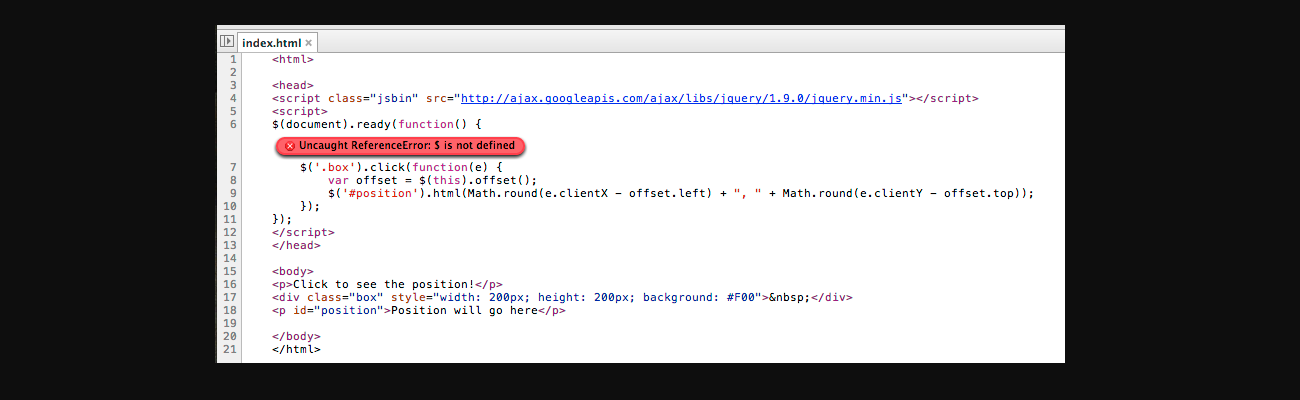
Now, we will have a look at some common reasons that cause the error Uncaught referenceerror $ is not defined.
- Reason 1: This error appears because the jQuery plugin is included before the jQuery file. By default, the jQuery plugin uses $, so the error will be shown if it can’t find it.
- Reason 2: Another common reason for the error ReferenceError: $ is not defined is an incorrect path.
- Reason 3: You may get the error if you are working offline but loading jQuery from the Internet.
Now that you understand the reasons, we would like to give you 3 solutions to fix the issue. Let’s explore the next part now!
How to solve the error Uncaught referenceerror $ is not defined?
If you get the error because of reason 1, you can deal with it by adding the jQuery.js file before the jQuery plugin files. For example:
<script src="/lib/jquery.min.js"></script>

<script src="/lib/jquery.plugin.js"></script>
For reason 2, an incorrect path means that there is a typo or the jQuery file has been moved to some other location, so the browsers won’t be able to load the jQuery file. In this case, it’s necessary for you to fix the path to the jQuery library.
The final solution to tackle the trouble is to check the Internet connection to make sure it works. Besides that, you can also use a local copy of the jQuery library. For instance:
<script src="/js/jquery.min.js"></script>
Wrap Up
All in all, we hope that the 3 solutions we suggested above will help you address the error Uncaught referenceerror $ is not defined. If the error is caused by something other than the 3 reasons we mentioned, let us know by leaving a comment below, and we will try to find the best methods to help you fix it. Moreover, don’t forget to share it with your friends to give them more recommendations.
Last but not least, we are offering many user-friendly and professional free WordPress Themes and Joomla 4 Templates. If you are looking for a new theme or template for your site, let’s have a look! Thanks for your visit and have a good day.