
As you know, thanks to tabs, you can keep your website organized, clean and presentable as well as enhance the conversion rates of your site. Therefore, installing a tabs tool is very useful. However, there are thousands of tabs plugins on the market these days, which may make you feel confused. In order to help you choose the best one easily, today we help you pick the best WordPress Tabs Plugins that may be helpful for you. Let’s start now!
What Are the Features of the Best WordPress Tabs Plugin?
Honestly, to choose the best WordPress Tabs Plugin, you have to consider many factors, including:
- Simple to use and quick to install
- Works well with other plugins
- 24/7 support
- Easy to translate into other languages
- Helps you insert multiple tabs on your site
- and much more
You should read the whole list below to compare and make the right decision for yourself.
Top WordPress Tabs Plugins
Tabs
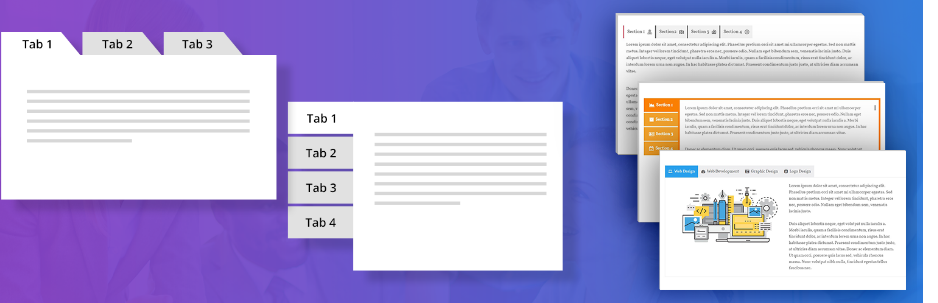
This WordPress Tabs Plugin is extremely user-friendly on any device. Thanks to this plugin, you can easily show vertical as well as horizontal tab styles. In addition, you can insert multiple tabs into your posts or pages very quickly.
Provided features:
- Unlimited color options
- Bootstrap framework based
- Slick Frontend and backend UI
- Add and remove tab items
- Less for quick customization
- Both horizontal and vertical styles available
- 20+ Design Templates
- 500+ Google Fonts
- 30+ Content Animations
- 4 types of background Overlay
- On Hover Tabs
Highlights:
- Easy to manage
- Hot and simple
- Excellent
JetTabs

JetTabs is a WordPress plugin that allows you to add stylish and responsive tabs and accordion blocks to your website. With JetTabs, you can create custom tabs and accordion blocks with various content types, including images, videos, text, and more, without any coding knowledge. The plugin comes with a range of customization options, allowing you to style your tabs and accordion blocks to match your website’s design.
Provided features:
- Customize the appearance of your tabs and accordion blocks, including the colors, fonts, and layout, to match your website’s design
- Add a variety of content types to your tabs and accordion blocks, including images, videos, text, and more
- Add custom content to your tabs and accordion blocks, including custom HTML and shortcodes
Highlights:
- Easy and simple to use
- Helpful
Custom Product Tabs for WooCommerce

This plugin gives shop owners the ability to add custom tabs to their products. In addition, it allows you to create saved tabs and then add them to multiple products. You can also easily add, remove and reorder tabs. Tabs can contain text, HTML, shortcodes, and images, edited in the standard WordPress text editor.
Provided features:
- Contain text, images, HTML or shortcodes
- Tab content areas
- Add custom tabs to products
- Default “Description” tab
- Create saved tabs
- Add saved tabs to multiple products
Highlights:
- Great plugin
- Compatible
- Works great
Tabby Responsive Tabs

Tabby Responsive Tabs is a WordPress Tabs Plugin that lets you insert a set of horizontal tabs that change into an accordion on narrow viewports. What’s more, this plugin also supports multiple sets of tabs on the same page.
Provided features:
- Tabby Responsive Tabs Customiser
- Tabby Tab to URL Link
- Tabs and accordion are created with jQuery
- Tabs and content are accessible via keyboard
- Supports multiple sets of tabs on the same page
- Adds a set of horizontal tabs
- Uses semantic header and content markup
Highlights:
- A simple and powerful plugin
- Customizable
- Fully responsive
Tabs – Responsive Tabs with Accordions

Tabs – Responsive Tabs with Accordions is a great WordPress Tabs Plugin which includes a lot of powerful features. With this plugin, you are able to create beautiful tab panels with any number of options as well as transition animation support. In addition, you can style them with any custom color in a presentable fashion.
Provided features:
- Multiple styles and layouts
- SEO-friendly and best eCommerce Tabs solution
- Mobile Editing and Canvas
- Built-in Visual Composer Extension
- Built for Developers
- Custom CSS
- Add interactivity
Highlights:
- Great plugin
- Easy to implement
- Elegant fashion
WP Tab Widget

This WordPress Tabs Plugin lets you change the number of tabs and the number of posts to display. Besides, you can also choose between 3 styles (big, small or no thumbnails) and show or hide the post date and the number of comments.
Provided features:
- Choose between Popular, Recent, Comments and Tags tabs
- In-built Pagination System
- Show/Hide post date
- Show/Hide the number of comments
- Control the order of the tabs
- Cool effects
- Easy to modify the CSS to better fit your theme style
- Choose between 3 unique styles of small, big or no thumbnails
- Change the number of tabs to show
- Control the number of posts to show
Highlights:
- Nice functionality
- Awesome Experience
Tab – Accordion, FAQ

This WordPress Tabs Plugin enables you to generate many types of tabs for your site such as animated tabs, vertical tabs, circle tabs, horizontal tabs and so on. In addition, you can also build tab panels with a lot of options as well as transition animation support.
Provided features:
- 31 types of Tabs
- 31 types of Accordions
- Use via shortcodes
- Awesome input field for content
- Fully responsive.
- Clean Design & Code.
- Easy to customize.
- Display specific category FAQ.
- Unlimited variations of usage.
Highlights:
- Nice and comfortable
- Great support
- Effective features
Tabs

Here is a great WordPress Tabs Plugin that allows you to show many kinds of tabs on your site through a shortcode. What’s more, this plugin is completely compatible with any theme, and it includes custom font color and size for the tab header and many other features.
Provided features:
- Fully responsive and mobile-ready.
- Unlimited Tabs anywhere.
- Use via short-code.
- Different themes.
- Background Image for Tabs area.
- Custom Active tabs background color.
- Custom default background color.
- Custom font color and size for Tabs header.
Highlights:
- Good plugin
- Easy to use
- Fully customizable
Squelch Tabs and Accordions Shortcodes

This WordPress Tabs Plugin enables you to create stylish Web 2.0 style accordions as well as tabs for your site. Moreover, because it includes collapsible accordions and tabs, it helps you save space on your site and add style as well.
Provided features:
- Add interactivity
- Add style
- Save space
- Separate content
- Add stylish Web 2.0 style accordions
- Add tabs or accordions
Highlights:
- Easy to use and customize
- Simple and practical
- Super fast and helpful
Conclusion
To wrap up, using a WordPress Tabs Plugin is a fantastic way to create tabs for your site without much effort. We will be pleased if you can easily and quickly find the best plugin after exploring the collection today. Please share it with your friends or anyone who needs WordPress Tabs Plugins to help them achieve their goals quickly.
Moreover, there are a large number of user-friendly and professional free WordPress themes here. Don’t forget to have a look whenever you need a new theme for your site. Thanks for your visit and see you again.