The Advanced Settings section of Helix Ultimate framework allows you to reduce size of loaded template files. It helps you improve your page speed, hence improve Google search engine ranking and offer a better experience for customers.
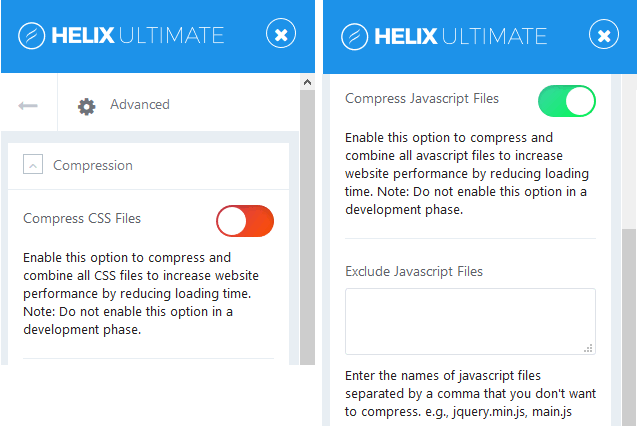
Image by Joomshaper
Compress CSS Files
When you enable this option, it will compress and combine all CSS files to reduce loading time, hence increase your Joomla website performance.
Note: Do not enable this option in a development period.
Compress JavaScript Files
When you enable this option, it will compress all JavaScript files into one to decrease total size and number of requests, so improve your site performance.
Note: Do not enable this option in a development period.
In some cases, it can damage some animation effects. In that case, you have to Exclude Javascript Files, and enter the names of javascript files separated by a comma that you don’t want to compress in the next field. (e.g., jquery.min.js, main.js.)
Compile SCSS to CSS
You can enable thí option to compress all SCSS files during each time your site loads if the SCSS file has been changed or edited. If your Joomla website is in production mode, then turn off this option.
SCSS stand for Sassy Cascading Style Sheets. It’s fully compatible with the syntax of CSS, while still supporting the full power of Sass.
Export & Import
This feature is useful if you want to transfer basic template setting between templates, ex: Font selection, Layout settings, Color Preset chosen etc. NOT for transfer demo data like articles, nor module content.
Hope this article will be useful for you in Advanced Settings of Helix Ultimate. If you have any question about this tutorial, don’t hesitate to leave a comment below. And don’t forget to share with your friends if you find it useful! Thanks! ?

- Replace WP-Cron with a Real Cron Job (and Fix Missed Schedules) – October 28, 2026
- 63 AI-Ready WordPress Block Themes for Local Businesses – October 15, 2026
- Fix “The Response Is Not a Valid JSON Response” in WordPress – October 14, 2026