Introduction
As you know, WordPress is a popular and easy-to-use platform. Many people decided to build a WordPress website to develop the business or simply share useful information about something. However, sometimes, there will be errors that make your site inaccessible. If you are owning a WordPress site and the posts returning 404 error happens regularly, don’t worry because we will help you solve this problem with the following instruction in the blog. Let’s explore 2 ways to fix posts returning 404 error now!
The methods to fix posts returning 404 error
Fix permalink settings
The main reason for this trouble is that there is something wrong with the .htaccess file or it was deleted. So, you just need to change the permalink settings to address this issue.
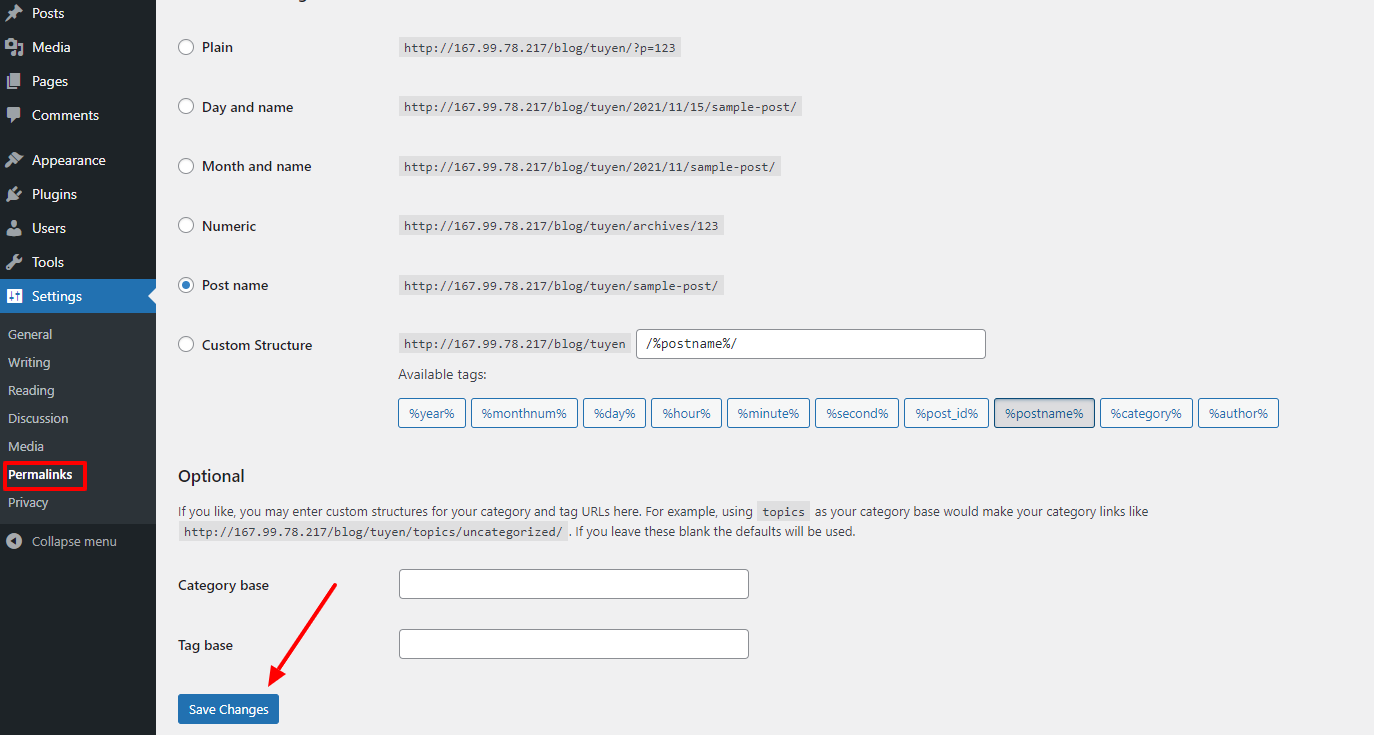
Now, on the admin dashboard, let’s go to Settings -> Permalinks, then you just need to click on the Save changes button.
By using this way, you have already updated the permalinks settings as well as flush rewrite rules easily.
If you follow this method and success to fix the posts returning 404 error, then congratulate. Conversely, in case the error persists, let’s try updating the .htaccess file manually with the next instructions.
Update .htaccess file
First of all, you need to log in to the server by using FTP. After that, in the place where folder /wp/content and /wp-includes/ are located, let’s edit the .htaccess file. All you need to do is simply add the following code to this file:
# BEGIN WordPress

<IfModule mod_rewrite.c>

RewriteEngine On

RewriteBase /

RewriteRule ^index\.php$ - [L]

RewriteCond %{REQUEST_FILENAME} !-f

RewriteCond %{REQUEST_FILENAME} !-d

RewriteRule . /index.php [L]

</IfModule>

# END WordPress
In case after trying 2 ways but they don’t work, let’s try switching off the mod security in the Cpanel. If it still doesn’t work, don’t hesitate to reach out to your hosting provider to ask about this issue.
Wind-up
In conclusion, we hope that the methods we mentioned above can support you to fix the posts returning 404 error. If you think this blog is useful for your friend, don’t forget to share it with them. What’s more? A large number of great and Free WordPress Themes are available for you to get, don’t miss them to make your site become more outstanding now!

- 63 AI-Ready WordPress Block Themes for Local Businesses – October 15, 2026
- Fix “The Response Is Not a Valid JSON Response” in WordPress – October 14, 2026
- Joomla Workflows: Set Up an Article Approval Process – October 13, 2026