LT Sportswear
Sportswear shop theme for Elementor: a temperature chart that shows each garment's range with today's line across it, catalogue pages with example prices and Ask about this links, shoe fittings and team kits.
Key features
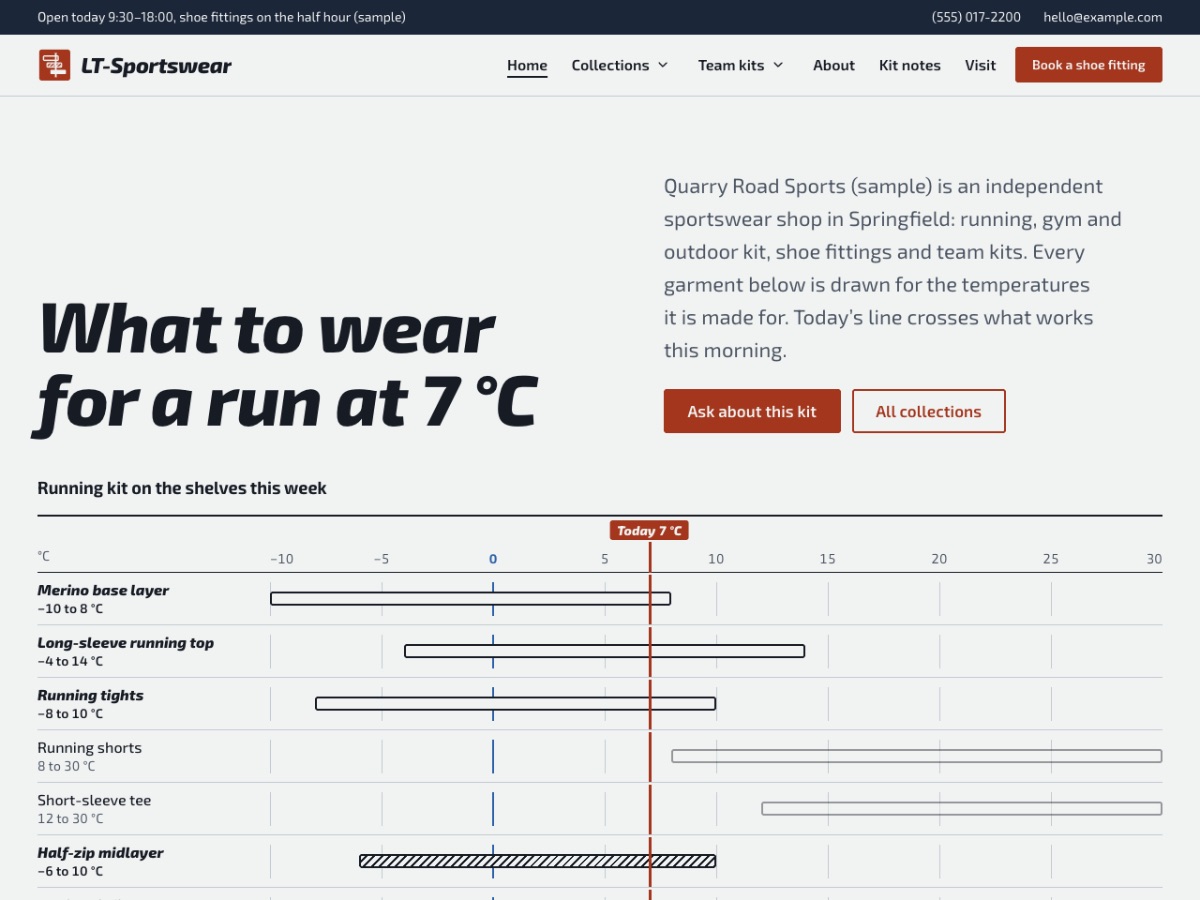
- The temperature chartThe home page opens with running kit as bars on one −10 to 30 °C scale: outlined = next to skin, hatched = mid layer, filled = outer layer, with today's temperature drawn across so the bars it crosses are what to wear.
- A catalogue without a checkoutRunning, gym and training, hiking and outdoor and team kits as label rows with fabric, sizes, the temperature range, example prices and an 'Ask about this' link to the request form.
- Winter and walking chartsThe same chart at −2 °C for winter running and at 12 °C for a day on the hills, so customers read their kit the way the shop counter talks.
- Shoe fittings and team kitsHow a running shoe fitting goes in four steps, a dress-for-the-weather guide, team kit orders with printing prices for names and numbers, and club shops.
- One-page modeSwitch the menu to scroll links for the home page sections, with smooth scrolling and the current section highlighted. In every edition: Free imports the one-page website.
- Free Elementor and a ready request formBuilt with free Elementor widgets on Hello Elementor, with a 'Kit question or fitting request' form made with the free WPForms Lite plugin. Fonts are bundled: no Google Fonts requests.
Let an AI assistant do the routine work
You can ask an AI assistant such as Claude, ChatGPT or Cursor to change texts, add pages or check your set-up. Here is what each edition gives you for that.
- AI assistant Free and Pro Ask the AI assistant on ltheme.com (the chat bubble) or Ask AI on doc.ltheme.com about installing and editing the theme. Free help also comes through the contact form. Contact form
- AI kit Included with Pro Unlimited A file that explains the theme to your AI assistant, ready prompts for common edits, and a checker that reports mistakes before you publish.
- Ticket support with AI-drafted answers Pro only Open a ticket and you get an instant AI-drafted answer; a person from our team follows up. Ticket support
Compatibility and requirements
| Platform | WordPress 6.6 or newer (tested with 7.1) |
|---|---|
| Page builder | Elementor, free version (tested with 4.3); Elementor Pro not needed |
| Parent theme | Hello Elementor (free, from WordPress.org) |
| PHP | 7.4 or newer (tested with 8.3 and 8.4) |
| Contact form | WPForms Lite (free) |
| Fonts | Exo 2, bundled (no Google Fonts requests) |
| Licence | Free: any site, credit stays. Pro Standard: one website. Pro Unlimited: unlimited websites. |
| Editions | Free: theme + one-page website import. Pro: full multi-page website like the demo. |
| Support | Free: the AI assistant and the contact form. Pro: ticket support (with an instant AI-drafted answer). |
| Help | Documentation, ticket support, install service |
Questions
Do I need Elementor Pro?
No. LT Sportswear uses only the free Elementor plugin and the free Hello Elementor theme. The header and footer are part of the theme, so you do not need Theme Builder.
Does it work as a one-page site?
Yes, in every edition. Free imports the one-page website: the Home page sections on one scrolling page, with a menu that scrolls to them and highlights the current section. Pro imports the full multi-page website, and one-page mode is a switch in the Customizer (or the "One-page (scroll menu)" page template).
Does it have an online shop or checkout?
No. LT Sportswear is a catalogue: items with sizes, temperatures, prices and an 'Ask about this' link to a request form or your phone number. If you sell online, link the buttons to your shop.
How do I change a bar on the temperature chart?
Each bar is a Divider widget with classes such as lt-f-n5 lt-t-14 (from −5 to 14 °C) and lt-bar–mid (the layer). Change the classes and the range text beside it together; set today's line with lt-now-7 on the chart. The AI kit's AGENTS.md lists every class.
Will my site look like the demo?
Yes, with Pro: Appearance > Demo import creates every page, the colours, fonts, menu, header and footer. The demo photos are replaced by placeholders you swap for your own.
What is the difference between Free and Pro?
Free: theme + one-page website import (the Home page sections on one scrolling page with a scroll menu, imported in one click); the footer credit stays, and help comes from the AI assistant and the contact form. Pro: full multi-page website like the demo: all 14 pages, sample posts and one-click demo import, one-page mode too, credit removal (put your own copyright there), updates and ticket support. Pro Unlimited adds the AI kit.