

Upgrading any Content Management System (CMS) is often a double-edged sword. While it brings forth new features, enhanced security, and improved performance, it can also introduce unexpected issues. One such problem that has arisen during the transition from Joomla 5 (J5) to Joomla 6 (J6) is the frustrating error message: “Class ‘JFactory’ Not Found.”This error can halt development or site functionality, leaving users scrambling for a solution.
Understanding the Error
The error occurs primarily due to changes in the way Joomla 6 handles certain core classes, particularly after changes or deprecation of the old structures. The JFactory class, a cornerstone of the Joomla framework that facilitates the creation of various objects, may no longer be instantiated correctly if certain compatibility plugins are disabled.
In the case of updating a Helix template or any Joomla framework component, users might see this error prominently when they least expect it. The problem often indicates a deeper compatibility issue, especially with backward compatibility, which Joomla provides to ensure that older components and templates can function smoothly on newer versions.
The Root Cause
Upon investigation, one contributing factor to the “Class ‘JFactory’ Not Found” error is the Behavior – Backward Compatibility 6 plugin. This plugin plays a vital role in enabling legacy code and ensuring that updates don’t break existing functionalities.
When you upgrade from J5 to J6, if this plugin is disabled, it can lead to missing classes or functions that former extensions and templates rely on. Disabling this plugin often happens automatically during an upgrade, leading to confusion for many users.
Solution: Enabling the Compatibility Plugin
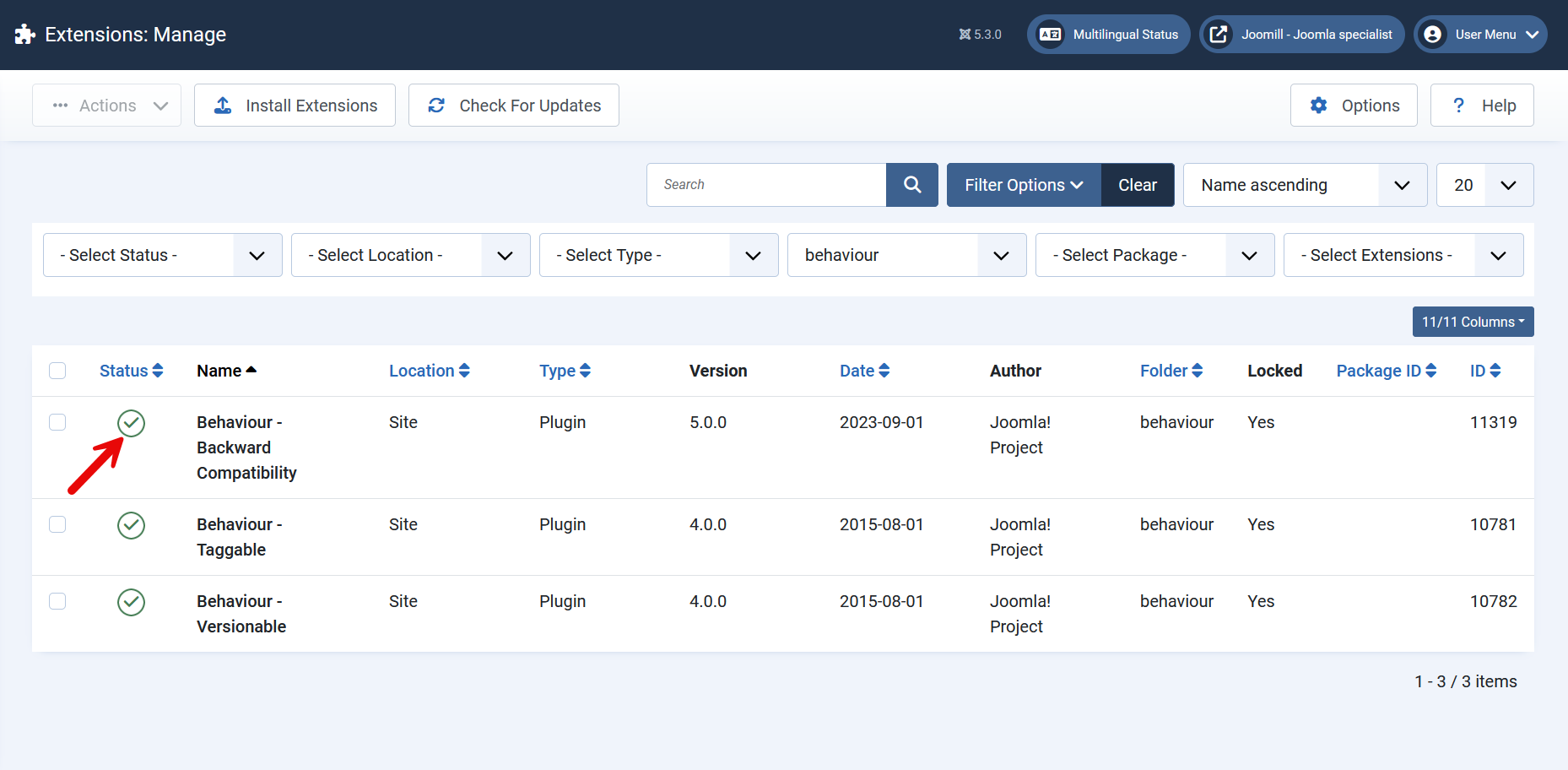
The good news is that resolving the error is relatively simple. Here are the steps to fix this issue effectively:
- Log into the Admin Panel: Access your Joomla site’s backend by visiting your admin URL.
- Navigate to the Plugin Manager: Go to
Extensions>Pluginsin the main menu. - Search for the Backward Compatibility Plugin: In the search box, type “Backward Compatibility” to quickly locate the necessary plugin.
- Enable the Plugin: Once found, check the status of the plugin. If it is disabled, activate it by switching on the status option.
- Check Your Site: After enabling the plugin, revisit the frontend of your site. The error message regarding the
JFactoryclass should now be resolved.
Verification and Follow-Up
Once the plugin has been activated, it is crucial to verify that all functionalities are operating as expected. Ensure that all components, modules, and menus are displaying correctly without any additional errors. Users might also want to clear their cache to ensure that they’re viewing the most updated version of the site.
If the error persists even after enabling the plugin, double-check for any other potential issues, such as conflicts with other extensions or outdated template files that may require updates.
Conclusion
The transition from Joomla 5 to Joomla 6 can present challenges, but understanding how to address them is key. The “Class ‘JFactory’ Not Found” error primarily points to compatibility issues due to the disabling of the Behavior – Backward Compatibility 6 plugin. By enabling this plugin, users can successfully navigate the upgrade process without losing critical functionality.
For more detailed troubleshooting, refer to forums and communities such as JoomShaper, where users often share their experiences and solutions. Upgrades are vital for the health of any web platform, but being prepared for potential issues ensures a smoother transition and better user experience.

- Resolving the “Class JFactory Not Found” Error in Joomla When Upgrading to J6 - December 19, 2025
- The Utility Of VPNs For Site Authors And Admins - November 24, 2025
- Joomla! 6: What’s New and How to Upgrade from Joomla! 5 - October 23, 2025



Recent Comments