
Are you wondering how to create a privacy policy page in WordPress? This article shows you the easiest way to do it.
What is a Privacy Policy page?
A Privacy Policy is a legal document that informs your website visitors about the personal information you collect. Additionally, the privacy policy should explain how you plan to use their data and keep that information safe and secure.
For example, if you display advertisements via a third-party website, you will generally share a lot of personal information with your advertising partners. Or, if you are creating an email list, you need to assure your users that their email addresses will not be shared with or sold to any other websites.
Your WordPress site may collect private information from users, including names, emails, addresses, phone numbers, and other forms of identification. It can be collected in several ways, such as through contact forms, WordPress comments, advertising programs, or Google Analytics.
Why should you add a Privacy Policy to your WordPress site?
There are several reasons why you need to create a Privacy Policy page on your site:
- It is required by law
This privacy policy is required by law in the United States, Canada, the European Union, Australia, and other jurisdictions worldwide. These laws allow users to control their personal information when visiting any website.
- Build customer trust
When you collect a lot of personal data from your customers or website visitors, such as names, addresses, emails, and much more, most people naturally want to know what this information will be used for. Therefore, having a privacy policy on your website will give your customers and visitors a professional edge as well as build trust between you and your users. In addition, it also protects your site from any potential legal issues.
- Bring you legal protection
Including a privacy policy page also brings other benefits, such as protecting you from lawsuits from customers as well as other businesses.
How to create a privacy policy in WordPress
There are several ways that can help you create a privacy policy without effort. However, in today’s tutorial, we will show you how to add a privacy policy page by using WordPress’s built-in privacy policy page. This is one of the simplest and most popular methods. Now, let’s go over the following sections.
Creating a WordPress Privacy Policy
WordPress allows you to create a privacy policy page in the settings section. It also provides a generic privacy policy template that helps you easily add content to it.
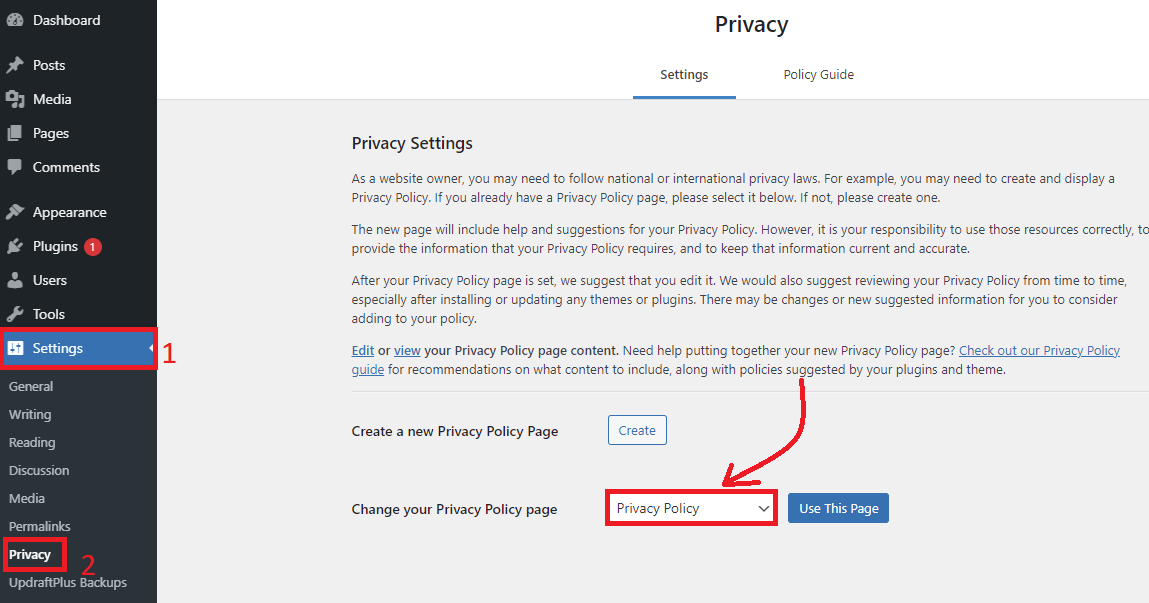
First of all, simply go to Settings > Privacy on your dashboard. This will bring you to the Privacy page. Here, you will see that WordPress has already generated a Privacy Policy page for you. In addition, WordPress gives you an overview of what a privacy policy means, along with the steps that you need to take.
You can use the pre-built privacy policy page as your privacy page by clicking on the “Use This Page” button. Otherwise, if you want to create your own privacy policy page, click on the “Create” button
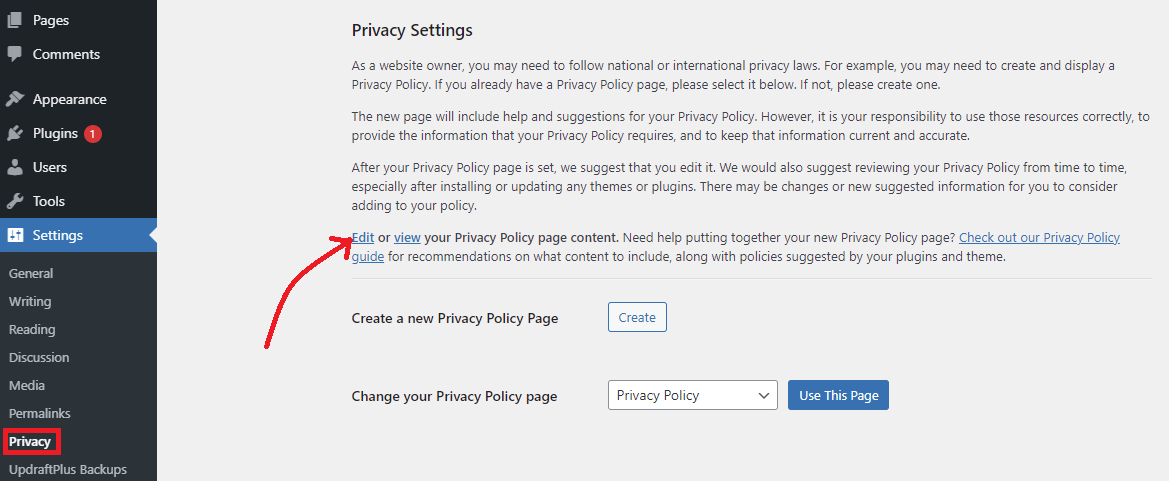
If you want to use the pre-made Privacy Policy Page, you need to click on the Edit option to make changes according to your purposes.
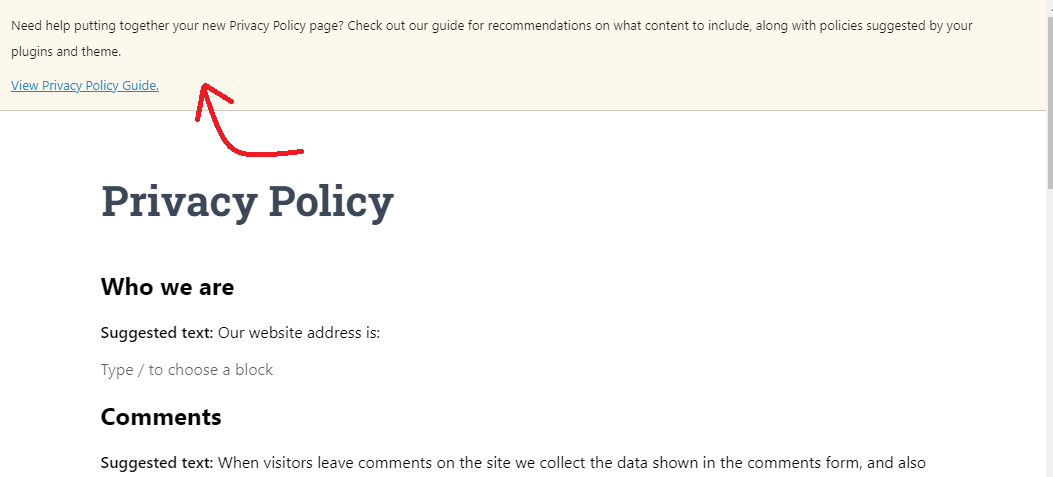
After clicking on the Edit option, this will take you to the privacy policy page for editing. At the top of the page, you will see a notice linking to a privacy policy guide, which offers recommendations for what content to add to your privacy policy page.
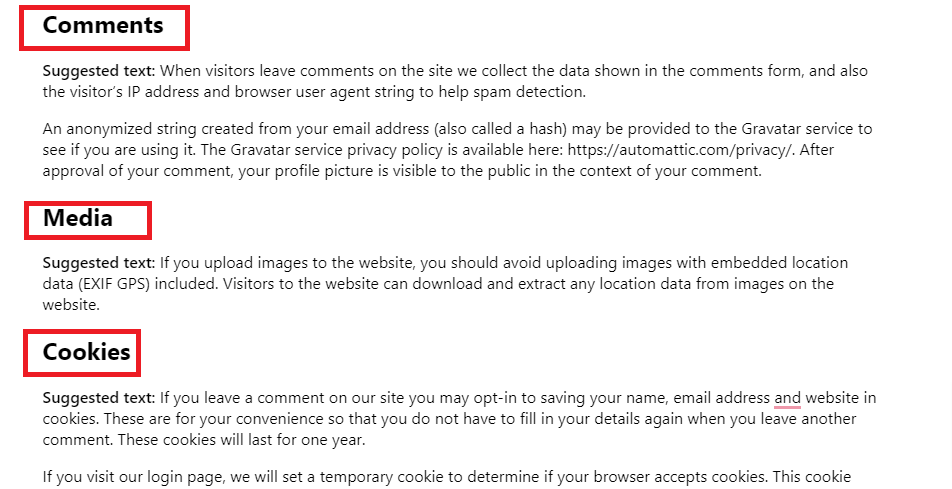
If you look at the content of your draft privacy policy page, you will see many sections, for example comments, media, contact forms, cookies, and much more.
Adding Your Privacy Policy Link to WordPress Footer With a Widget
You could add the privacy policy to various places on your site such as the sidebar, navigation menu, and much more. However, most websites choose the footer as the best place to present their privacy policy, because it not only makes the policy visible but also saves a lot of space in your main navigation menu.
There are numerous ways to display your privacy policy in the footer. In today’s blog, we will give you the easiest method by using a widget.
Firstly, the majority of WordPress themes are designed with widget-ready areas in the footer, known as the footer sidebar. You can check it out by going to the Appearance > Widgets page.
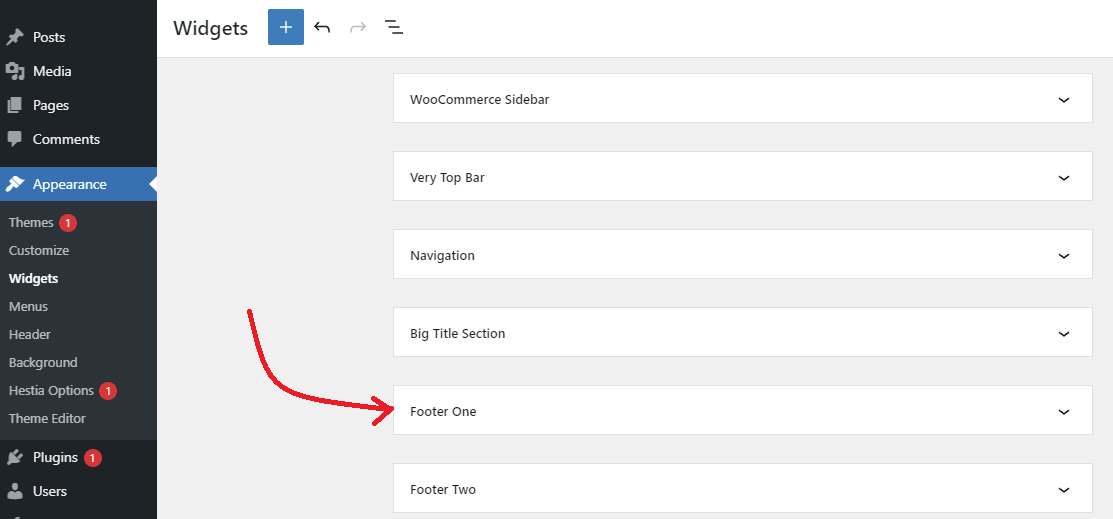
If your theme has a footer sidebar, you can use the navigation widget to display the privacy policy. However, you need to create a navigation menu first.
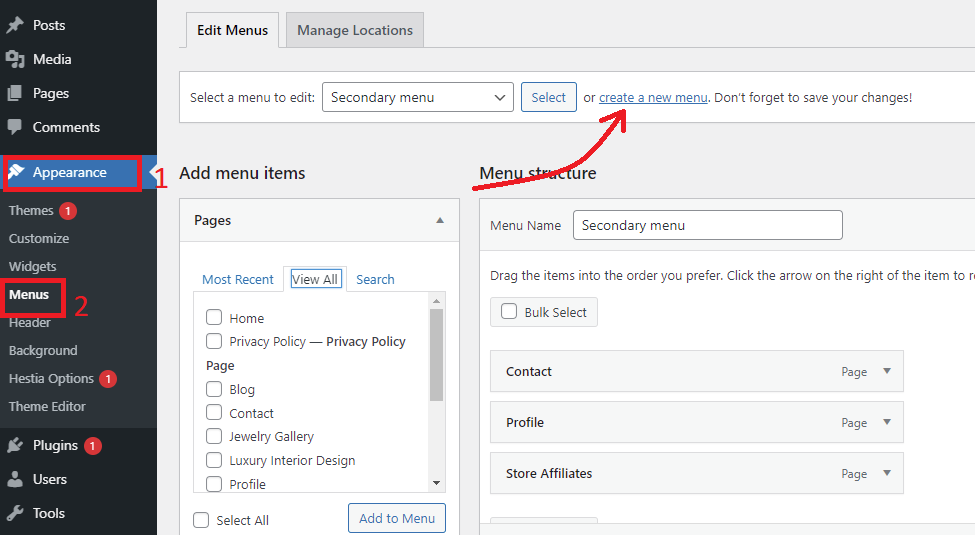
Navigate to Appearance > Menus on your dashboard and then click on the “Create a new menu” option.
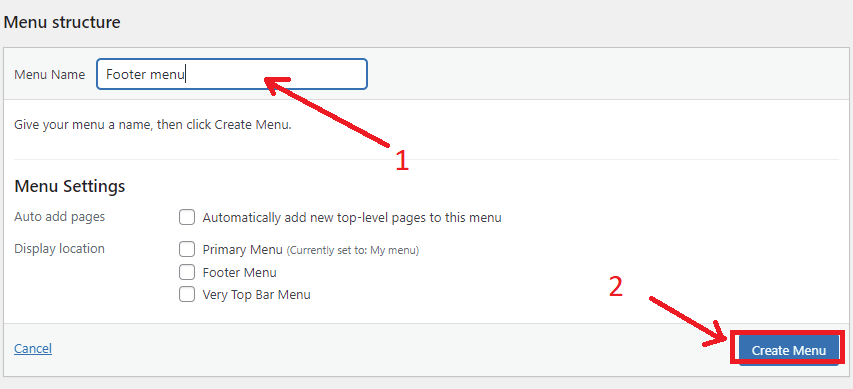
Below the Menu structure section, you need to enter a name for your navigation menu and then click on the “Create Menu” button.
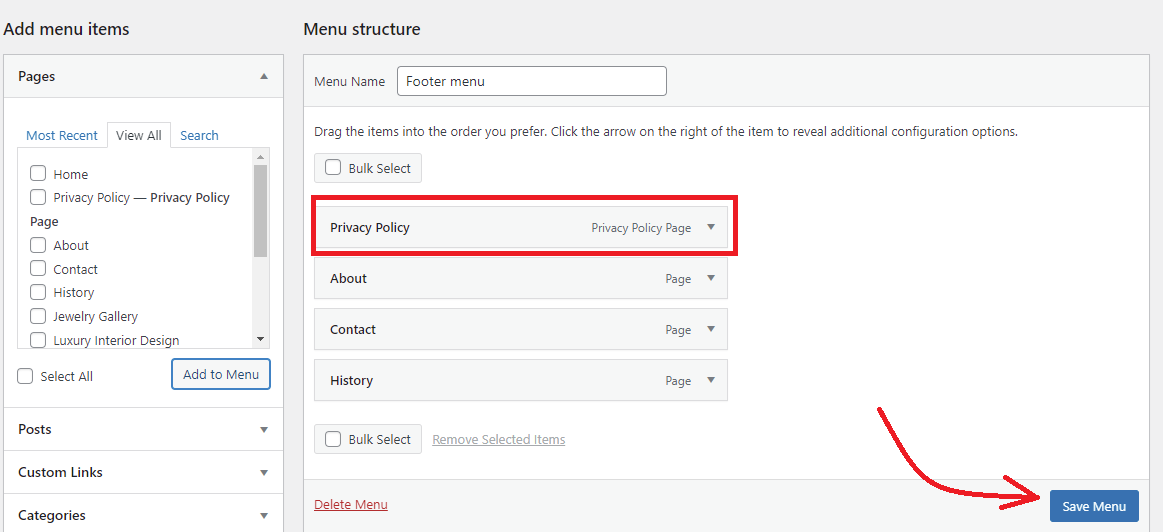
In the Add menu items section, choose the pages that you want to include in your navigation menu. And then click on the ‘Add to Menu’ button
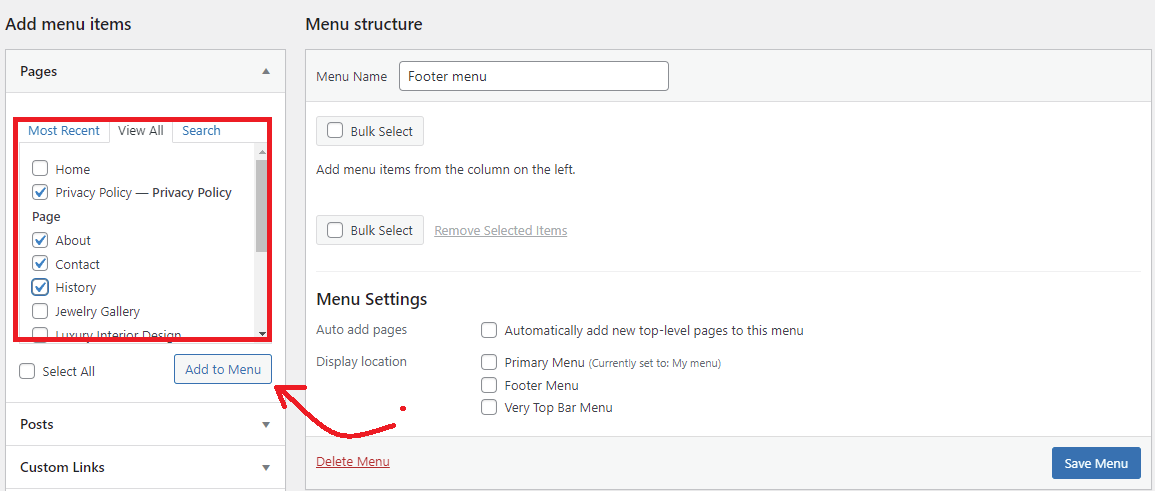
Now, you can easily rearrange the items by dragging them according to your preference and then click on the “Save menu” button.
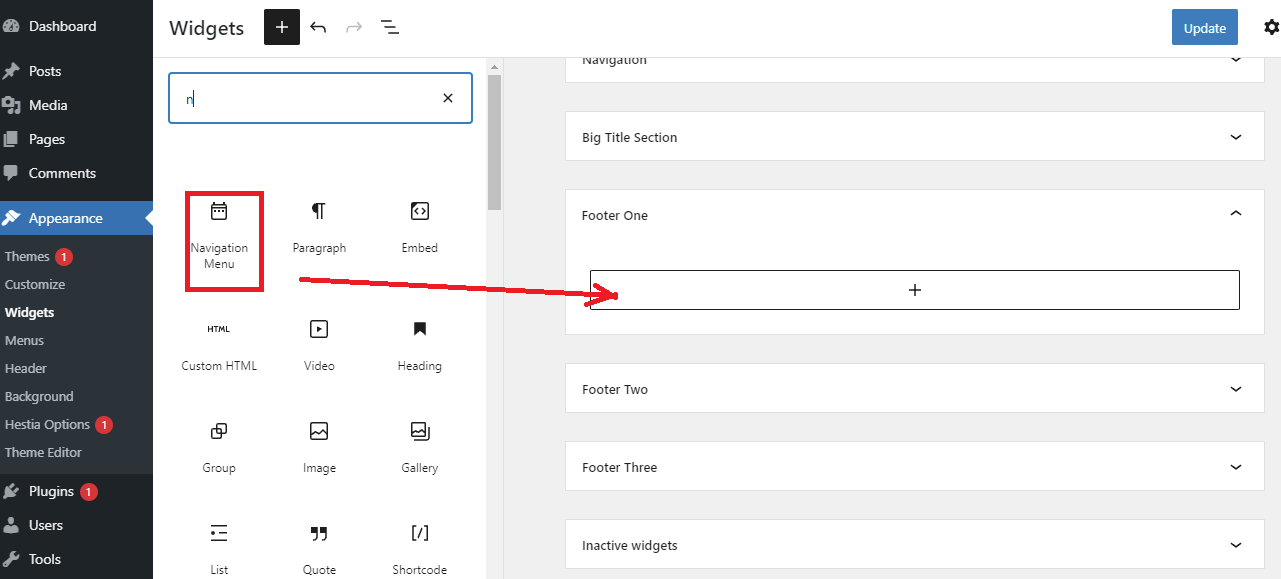
Now, go to Appearance > Widgets page. Simply search for Navigation Menu in the search bar and drag it to the Footer sidebar.
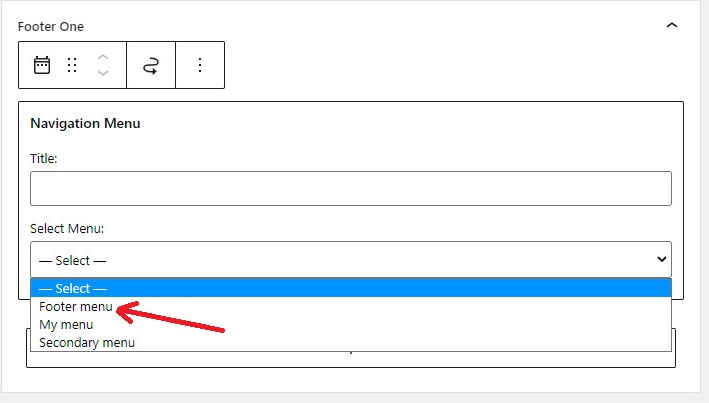
Next, click on the arrow symbol in the Select Menu section and then choose the menu that you have just created. You can also fill in a title for your navigation menu. Don’t forget to click on the Update button to store your changes.
Now, visit your website and scroll down to the bottom to see how it looks.

Wrap up
We hope that this guide gives you the most effective solution to create a privacy policy page in WordPress. If you encounter any difficulties or need our assistance, let us know by leaving a comment below. We will support you as soon as possible.
By the way, our free WordPress theme collection has over 300 beautiful, fully responsive themes. If you are going to build your desired website, don’t miss it.